> ## Documentation Index
> Fetch the complete documentation index at: https://docs.fly.io/llms.txt
> Use this file to discover all available pages before exploring further.
# Easy Clustering from Home to Fly.io
This explains how to cluster a locally running Elixir application with another Elixir application running on Fly.io. Additionally, a [**bash script** (named `cluster_with_remote`)](https://gist.github.com/brainlid/9e02e95f7d9c65a23312a4df95094d2a) is provided to automate the process of starting the local node and clustering it with the server.
Here we cover *why* we might want to do this, *what* is required to make it work, and *how* to make it happen.
## Why cluster a local application with the one on the server?
Besides being really cool that we can do this, there are some practical reasons as well.
### Develop and debug a distributed application
Building a globally distributed application can be challenging to model locally. With [Fly.io Regions](/reference/regions), we can deploy our cluster-aware application where it makes sense. Then, our local application joins the global cluster, giving us a close-up view of how the application behaves in a truly globally distributed environment.
## How it works
Elixir supports [clustering](/elixir/the-basics/clustering) multiple running Elixir applications together (thanks to [Erlang](https://www.erlang.org/doc/reference_manual/distributed.html)), even while running on separate machines.
Fly.io makes creating a [WireGuard VPN tunnel](/networking/private-networking#private-network-vpn) between your local machine and your Fly.io organization easy.
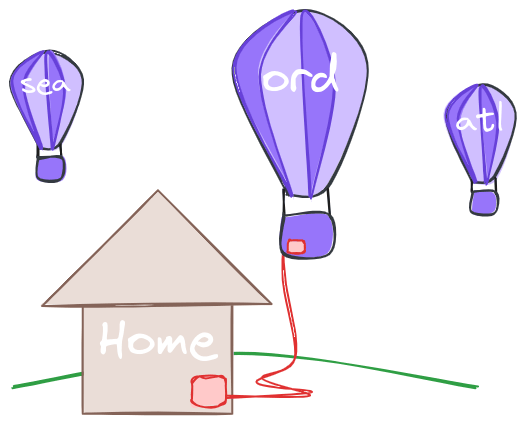 This means we can connect and cluster our locally running Elixir application with an Elixir application deployed at Fly.io. There are some special configuration requirements needed to make this possible, but we cover it all here.
### Prerequisites
There are a few prerequisites to consider when clustering a local Elixir application to one running in Fly.io. We'll provide tools or instructions to help with each.
1. A [WireGuard connection](/networking/private-networking#private-network-vpn) must be setup and open from your local machine to Fly.io
2. The same version of Elixir and Erlang OTP must be running on both ends.
3. The locally running Elixir application needs the Erlang COOKIE used on the server.
4. We need the full node name of the Elixir node running on the server (**NOTE:** The bash script provided later does this for you.)
5. The local Elixir application must be started with IPv6 networking support enabled. By default it does not.
### Setting the Erlang cookie
The [recommended way for setting the Erlang COOKIE](/elixir/the-basics/clustering#making-the-cookie-changes) value in your deployed application is to set an ENV named `RELEASE_COOKIE`. This gives the server a stable, predictable cookie value. In order for the nodes to connect, they need the same cookie.
When [set in the ENV through Fly.io](/flyctl/cmd/fly_config_env), we can read it from the application's information. The script does this so we don't have to do anything else.
### Starting with IPv6 support
Fly.io uses an IPv6 network internally for private IPs. The BEAM needs IPv6 support to be enabled explicitly. On the server, that’s taken care of through a Dockerfile. Locally, however, it needs to be enabled so the local application can cluster with the remote node.
The issue is, if IPv6 support is enabled globally, like in a `.bashrc` file, then setting it in the `cluster_with_remote` script essentially flips it OFF. If NOT set globally, then it should be set in the script. Choose the approach that best fits your situation.
When set globally in your `.bashrc` file (recommended), it looks like this:
```
export ERL_AFLAGS="-kernel shell_history enabled -proto_dist inet6_tcp"
```
This one includes the added benefit of turning on shell history in IEx. Yay!
If not set globally, it can be set in the script command like this:
```
iex --erl "-proto_dist inet6_tcp" --sname local [...]
```
Where the `--erl "-proto_dist inet6_tcp"` portion is the key.
### Hidden by default: A note about production systems
Joining your local application to a production cluster in a public way may result in other application sending work, tasks, or executing processes in your local node, depending on the behavior of your specific application. This may not be what you want!
For this reason, the script uses the `--hidden` option to hide the local node from the rest of the cluster.
To see the ***all*** the connected nodes, including any hidden ones, use:
```elixir theme={null}
Node.list(:hidden)
```
If you want the local Elixir application to be *fully visible* to the rest of the cluster, remove the `--hidden` argument in the bash script.
## Bash script file
Create [this file](https://gist.github.com/brainlid/9e02e95f7d9c65a23312a4df95094d2a) locally in your root of your Elixir project.
```sh expandable theme={null}
#!/bin/bash
# After opening a WireGuard connection to your Fly.io network, copy this file
# into the directory for your Elixir application. Run the script to start the
# local Elixir project and cluster it to an application running on Fly.io.
# In order for this to work:
# - Your wireguard connection must be up.
# - When run from a directory with a `fly.toml` file, `flyctl` command is used
# to access information about the application.
# - Set the ENV `CLUSTER_APP_NAME` to specify a different hosted app name.
# - Set the ENV `RELEASE_COOKIE` to override the Erlang cookie used for
# clustering. It uses the the value from the deployed app if it is set there.
# - Run the script.
set -e
if ! command -v jq &> /dev/null; then
echo "jq is not installed. Please install it before running this script. It is a command-line JSON processor."
exit 1
fi
# Check if CLUSTER_APP_NAME is set and use it if found
if [[ -n $CLUSTER_APP_NAME ]]; then
# Use the override app_name from the ENV
json_data=$(fly status --app ${CLUSTER_APP_NAME} --json)
else
# Use the app_name for the current app
json_data=$(fly status --json)
fi
# Use an explicit RELEASE_COOKIE value if provided
if [ -n "$RELEASE_COOKIE" ]; then
release_cookie=$RELEASE_COOKIE
else
# Extract the RELEASE_COOKIE value from the deployed app
release_cookie=$(echo "$json_data" | jq -r '.Machines[] | select(.state == "started") | .config | .env | .RELEASE_COOKIE' | head -n 1)
if [ $release_cookie == "null" ]; then
echo "The deployed application did not set RELEASE_COOKIE ENV. If the cookie is static on the server, provide it locally through RELEASE_COOKIE."
exit 1
fi
fi
# Extract the app_name
app_name=$(echo "$json_data" | jq -r '.Name')
# Extract private_ip for the first started machine
private_ip=$(echo "$json_data" | jq -r '.Machines[] | select(.state == "started") | .private_ip' | head -n 1)
# Extract image_ref tag hash for the first started machine
image_tags=$(echo "$json_data" | jq -r '.Machines[] | select(.state == "started") | .image_ref.tag | sub("deployment-"; "")' | head -n 1)
if [ -z "$private_ip" ]; then
echo "No instances appear to be running at this time."
exit 1
fi
# Assemble the full node name
full_node_name="${app_name}-${image_tags}@${private_ip}"
echo Attempting to connect to $full_node_name
# IMPORTANT:
# ==========
# Fly.io uses an IPv6 network internally for private IPs. The BEAM needs IPv6
# support to be enabled explicitly.
#
# The issue is, if it's enabled globally like in a `.bashrc` file, then setting
# it here essentially flips it OFF. If not set globally, then it should be set
# here. Choose the version that fits your situation.
#
# It's the `--erl "-proto_dist inet6_tcp"` portion.
# export ERL_AFLAGS="-kernel shell_history enabled -proto_dist inet6_tcp"
# Toggles on IPv6 support for the local node being started.
# iex --erl "-proto_dist inet6_tcp" --sname local --cookie ${release_cookie} --hidden -e "IO.inspect(Node.connect(:'${full_node_name}'), label: \"Node Connected?\"); IO.inspect(Node.list(:hidden), label: \"Connected Nodes\")" -S mix phx.server
# Does NOT toggle on IPv6 support, assuming it is enabled some other way.
iex --sname local --cookie ${release_cookie} --hidden -e "IO.inspect(Node.connect(:'${full_node_name}'), label: \"Node Connected?\"); IO.inspect(Node.list(:hidden), label: \"Connected Nodes\")" -S mix phx.server
```
Make the script file executable.
```
chmod +x cluster_with_remote
```
## Script usage
With the perquisites out of the way, we'll use the `cluster_with_remote` script to start our local Elixir application. The script automates much of what needs to be done to make the process work smoothly. Feel free to customize the script as needed.
The script is designed to be copied into a project with little to no modification required. The only expected customizations are handled through ENV values that can be controlled per-project.
There are two primary ways to use the script:
1. Cluster the local application to the same project deployed at Fly.io. This is the same application running in two places.
2. Cluster a local application to a difference project deployed at Fly.io. The deployed application's name must be provided.
### Cluster to the same application running on the server
The simplest variation is when we cluster our local application to a deployed version of itself. The `fly.toml` file in the directory with a copy of the `cluster_with_remote` is for the deployed application.
To do this, just execute the script:
```
./cluster_with_remote
```
The script outputs if the clustering connection succeeded and prints the names of the connected nodes.
### Cluster to a different application running on the server
There are times when the local application is connecting to a *different* application than where the script is running from.
To do this, we need to tell the script the Fly.io app name of the application we want to connect with. It can be done like this:
```
CLUSTER_APP_NAME=server-app-name ./cluster_with_remote
```
This can also be set as a project-specific ENV using a tool like [direnv](https://direnv.net/) or [dotenv](https://www.dotenv.org/). The custom app name to cluster with can be written to env file and then running the script just works.
```
./cluster_with_remote
```
If the Erlang cookie of the deployed application is not set using the recommended `RELEASE_COOKIE` ENV setting, it can still be provided to the script using a local ENV named `RELEASE_COOKIE`. See the script for details.
This means we can connect and cluster our locally running Elixir application with an Elixir application deployed at Fly.io. There are some special configuration requirements needed to make this possible, but we cover it all here.
### Prerequisites
There are a few prerequisites to consider when clustering a local Elixir application to one running in Fly.io. We'll provide tools or instructions to help with each.
1. A [WireGuard connection](/networking/private-networking#private-network-vpn) must be setup and open from your local machine to Fly.io
2. The same version of Elixir and Erlang OTP must be running on both ends.
3. The locally running Elixir application needs the Erlang COOKIE used on the server.
4. We need the full node name of the Elixir node running on the server (**NOTE:** The bash script provided later does this for you.)
5. The local Elixir application must be started with IPv6 networking support enabled. By default it does not.
### Setting the Erlang cookie
The [recommended way for setting the Erlang COOKIE](/elixir/the-basics/clustering#making-the-cookie-changes) value in your deployed application is to set an ENV named `RELEASE_COOKIE`. This gives the server a stable, predictable cookie value. In order for the nodes to connect, they need the same cookie.
When [set in the ENV through Fly.io](/flyctl/cmd/fly_config_env), we can read it from the application's information. The script does this so we don't have to do anything else.
### Starting with IPv6 support
Fly.io uses an IPv6 network internally for private IPs. The BEAM needs IPv6 support to be enabled explicitly. On the server, that’s taken care of through a Dockerfile. Locally, however, it needs to be enabled so the local application can cluster with the remote node.
The issue is, if IPv6 support is enabled globally, like in a `.bashrc` file, then setting it in the `cluster_with_remote` script essentially flips it OFF. If NOT set globally, then it should be set in the script. Choose the approach that best fits your situation.
When set globally in your `.bashrc` file (recommended), it looks like this:
```
export ERL_AFLAGS="-kernel shell_history enabled -proto_dist inet6_tcp"
```
This one includes the added benefit of turning on shell history in IEx. Yay!
If not set globally, it can be set in the script command like this:
```
iex --erl "-proto_dist inet6_tcp" --sname local [...]
```
Where the `--erl "-proto_dist inet6_tcp"` portion is the key.
### Hidden by default: A note about production systems
Joining your local application to a production cluster in a public way may result in other application sending work, tasks, or executing processes in your local node, depending on the behavior of your specific application. This may not be what you want!
For this reason, the script uses the `--hidden` option to hide the local node from the rest of the cluster.
To see the ***all*** the connected nodes, including any hidden ones, use:
```elixir theme={null}
Node.list(:hidden)
```
If you want the local Elixir application to be *fully visible* to the rest of the cluster, remove the `--hidden` argument in the bash script.
## Bash script file
Create [this file](https://gist.github.com/brainlid/9e02e95f7d9c65a23312a4df95094d2a) locally in your root of your Elixir project.
```sh expandable theme={null}
#!/bin/bash
# After opening a WireGuard connection to your Fly.io network, copy this file
# into the directory for your Elixir application. Run the script to start the
# local Elixir project and cluster it to an application running on Fly.io.
# In order for this to work:
# - Your wireguard connection must be up.
# - When run from a directory with a `fly.toml` file, `flyctl` command is used
# to access information about the application.
# - Set the ENV `CLUSTER_APP_NAME` to specify a different hosted app name.
# - Set the ENV `RELEASE_COOKIE` to override the Erlang cookie used for
# clustering. It uses the the value from the deployed app if it is set there.
# - Run the script.
set -e
if ! command -v jq &> /dev/null; then
echo "jq is not installed. Please install it before running this script. It is a command-line JSON processor."
exit 1
fi
# Check if CLUSTER_APP_NAME is set and use it if found
if [[ -n $CLUSTER_APP_NAME ]]; then
# Use the override app_name from the ENV
json_data=$(fly status --app ${CLUSTER_APP_NAME} --json)
else
# Use the app_name for the current app
json_data=$(fly status --json)
fi
# Use an explicit RELEASE_COOKIE value if provided
if [ -n "$RELEASE_COOKIE" ]; then
release_cookie=$RELEASE_COOKIE
else
# Extract the RELEASE_COOKIE value from the deployed app
release_cookie=$(echo "$json_data" | jq -r '.Machines[] | select(.state == "started") | .config | .env | .RELEASE_COOKIE' | head -n 1)
if [ $release_cookie == "null" ]; then
echo "The deployed application did not set RELEASE_COOKIE ENV. If the cookie is static on the server, provide it locally through RELEASE_COOKIE."
exit 1
fi
fi
# Extract the app_name
app_name=$(echo "$json_data" | jq -r '.Name')
# Extract private_ip for the first started machine
private_ip=$(echo "$json_data" | jq -r '.Machines[] | select(.state == "started") | .private_ip' | head -n 1)
# Extract image_ref tag hash for the first started machine
image_tags=$(echo "$json_data" | jq -r '.Machines[] | select(.state == "started") | .image_ref.tag | sub("deployment-"; "")' | head -n 1)
if [ -z "$private_ip" ]; then
echo "No instances appear to be running at this time."
exit 1
fi
# Assemble the full node name
full_node_name="${app_name}-${image_tags}@${private_ip}"
echo Attempting to connect to $full_node_name
# IMPORTANT:
# ==========
# Fly.io uses an IPv6 network internally for private IPs. The BEAM needs IPv6
# support to be enabled explicitly.
#
# The issue is, if it's enabled globally like in a `.bashrc` file, then setting
# it here essentially flips it OFF. If not set globally, then it should be set
# here. Choose the version that fits your situation.
#
# It's the `--erl "-proto_dist inet6_tcp"` portion.
# export ERL_AFLAGS="-kernel shell_history enabled -proto_dist inet6_tcp"
# Toggles on IPv6 support for the local node being started.
# iex --erl "-proto_dist inet6_tcp" --sname local --cookie ${release_cookie} --hidden -e "IO.inspect(Node.connect(:'${full_node_name}'), label: \"Node Connected?\"); IO.inspect(Node.list(:hidden), label: \"Connected Nodes\")" -S mix phx.server
# Does NOT toggle on IPv6 support, assuming it is enabled some other way.
iex --sname local --cookie ${release_cookie} --hidden -e "IO.inspect(Node.connect(:'${full_node_name}'), label: \"Node Connected?\"); IO.inspect(Node.list(:hidden), label: \"Connected Nodes\")" -S mix phx.server
```
Make the script file executable.
```
chmod +x cluster_with_remote
```
## Script usage
With the perquisites out of the way, we'll use the `cluster_with_remote` script to start our local Elixir application. The script automates much of what needs to be done to make the process work smoothly. Feel free to customize the script as needed.
The script is designed to be copied into a project with little to no modification required. The only expected customizations are handled through ENV values that can be controlled per-project.
There are two primary ways to use the script:
1. Cluster the local application to the same project deployed at Fly.io. This is the same application running in two places.
2. Cluster a local application to a difference project deployed at Fly.io. The deployed application's name must be provided.
### Cluster to the same application running on the server
The simplest variation is when we cluster our local application to a deployed version of itself. The `fly.toml` file in the directory with a copy of the `cluster_with_remote` is for the deployed application.
To do this, just execute the script:
```
./cluster_with_remote
```
The script outputs if the clustering connection succeeded and prints the names of the connected nodes.
### Cluster to a different application running on the server
There are times when the local application is connecting to a *different* application than where the script is running from.
To do this, we need to tell the script the Fly.io app name of the application we want to connect with. It can be done like this:
```
CLUSTER_APP_NAME=server-app-name ./cluster_with_remote
```
This can also be set as a project-specific ENV using a tool like [direnv](https://direnv.net/) or [dotenv](https://www.dotenv.org/). The custom app name to cluster with can be written to env file and then running the script just works.
```
./cluster_with_remote
```
If the Erlang cookie of the deployed application is not set using the recommended `RELEASE_COOKIE` ENV setting, it can still be provided to the script using a local ENV named `RELEASE_COOKIE`. See the script for details.
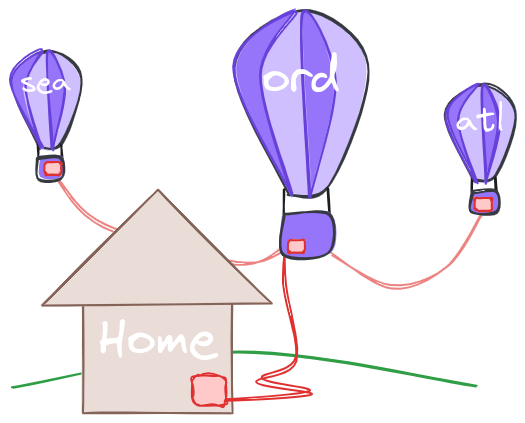 Now you're *really* doing distributed Elixir!
## Summary
When we couple Elixir's clustering ability with Fly.io's networking, VPN, and API discoverability, we can easily cluster a locally running Elixir application with a deployed Elixir application. This makes it easy to develop and debug distributed applications.
The ready-to-use script automates much of the process.
Now you're *really* doing distributed Elixir!
## Summary
When we couple Elixir's clustering ability with Fly.io's networking, VPN, and API discoverability, we can easily cluster a locally running Elixir application with a deployed Elixir application. This makes it easy to develop and debug distributed applications.
The ready-to-use script automates much of the process.