> ## Documentation Index
> Fetch the complete documentation index at: https://docs.fly.io/llms.txt
> Use this file to discover all available pages before exploring further.
# Using Inertia SSR
export const Small = ({children}) => {
return {children};
};
[Inertia](https://inertiajs.com/) allows you to work with your Laravel monolith application, *and still* use frontend libraries and frameworks such as [React](https://react.dev/), [Vue](https://vuejs.org/), and [Svelte](https://svelte.dev/)! Furthermore, it supports [Server-side Rendering](https://inertiajs.com/server-side-rendering), which allows HTML content to be rendered from the server instead of the client.
Once you've completed the [Server-side Rendering setup](https://inertiajs.com/server-side-rendering) for your local app, dive in below to deploy your server-side rendered, Laravel Inertia-SPA at Fly.io!
***
## Dockerfile Changes
[Inertia SSR](https://inertiajs.com/server-side-rendering) requires a background [Node process](https://inertiajs.com/server-side-rendering#:~:text=Node%20must%20be%20available) that will render requested html pages. You'll have to update Fly.io's generated `Dockerfile` for your Laravel app in order to include support for `Node`. You can follow any of the below options to include `Node`:
### Option 1: Quick copy of Node to Final Image
The Laravel fly-scanner already generates a Dockerfile that makes use of a `Node` image, but uses a different final image. The quickest way to include Node into your app's final image, is to copy over the `Node` image's `node` binaries and generated `node_modules` to the final `fly-laravel` image:
```dockerfile theme={null}
FROM base
+ COPY --from=node_modules_go_brrr /usr/local/bin/node /usr/local/bin/node
+ COPY --from=node_modules_go_brrr /app/node_modules /var/www/html/node_modules
```
### Option 2: Install Node in Final Image
Of course, you can also instead opt to fully install `Node` in your final `fly-laravel` image. So, revise your Dockerfile to include instructions to install `node`, and build the necessary assets/node\_modules into your final image:
```dockerfile theme={null}
# Install node in fly-laravel image
RUN cd ~ \
&& curl -sL https://deb.nodesource.com/setup_18.x -o nodesource_setup.sh \
&& bash nodesource_setup.sh \
&& apt install nodejs \
&& cd /var/www/html
# The snippet below already exists in the Dockerfile btw,
# In the multi-stage build set up:
RUN if [ -f "vite.config.js" ]; then \
ASSET_CMD="build"; \
else \
ASSET_CMD="production"; \
fi; \
if [ -f "yarn.lock" ]; then \
yarn install --frozen-lockfile; \
yarn $ASSET_CMD; \
elif [ -f "pnpm-lock.yaml" ]; then \
corepack enable && corepack prepare pnpm@latest-8 --activate; \
pnpm install --frozen-lockfile; \
pnpm run $ASSET_CMD; \
elif [ -f "package-lock.json" ]; then \
npm ci --no-audit; \
npm run $ASSET_CMD; \
else \
npm install; \
npm run $ASSET_CMD; \
fi;
RUN chown -R www-data:www-data /var/www/html/public
EXPOSE 8080
ENTRYPOINT ["/entrypoint"]
```
Since we now have node and its assets/modules in the `fly-laravel` image, we can remove our multi-build setup where we use a separate `FROM node` image ( to build and copy assets and node\_modules ):
```dockerfile theme={null}
# Remove the "multi stage build setup" lines below:
- FROM node:${NODE_VERSION} as node_modules_go_brrr
- RUN mkdir /app
- RUN mkdir -p /app
- WORKDIR /app
- COPY . .
- COPY --from=base /var/www/html/vendor /app/vendor
# Remove the "set up to copy asset folder from node image to fly-laravel image"
# lines below:
- COPY --from=node_modules_go_brrr /app/public /var/www/html/public-npm
- RUN rsync -ar /var/www/html/public-npm/ /var/www/html/public/ && rm -rf /var/www/html/public-npm
```
## Running SSR as A Process
After getting your Dockerfile set up for Inertia SSR to work, you can run the SSR Server as a [background process](https://inertiajs.com/server-side-rendering#:~:text=server%20as%20a-,background%20process,-%2C%20typically%20using%20a). Here at Fly.io, you can easily run a separate VM for your SSR server instead of a monitoring tool like Supervisor.
Update your `fly.toml` file to include an `ssr` [process group](/launch/processes#run-multiple-processes):
```toml theme={null}
[processes]
app=""
ssr="php /var/www/html/artisan inertia:start-ssr"
```
Adding the SSR process above creates a new machine specially for your SSR server. You'll now have separate machines for your web app, and ssr server:
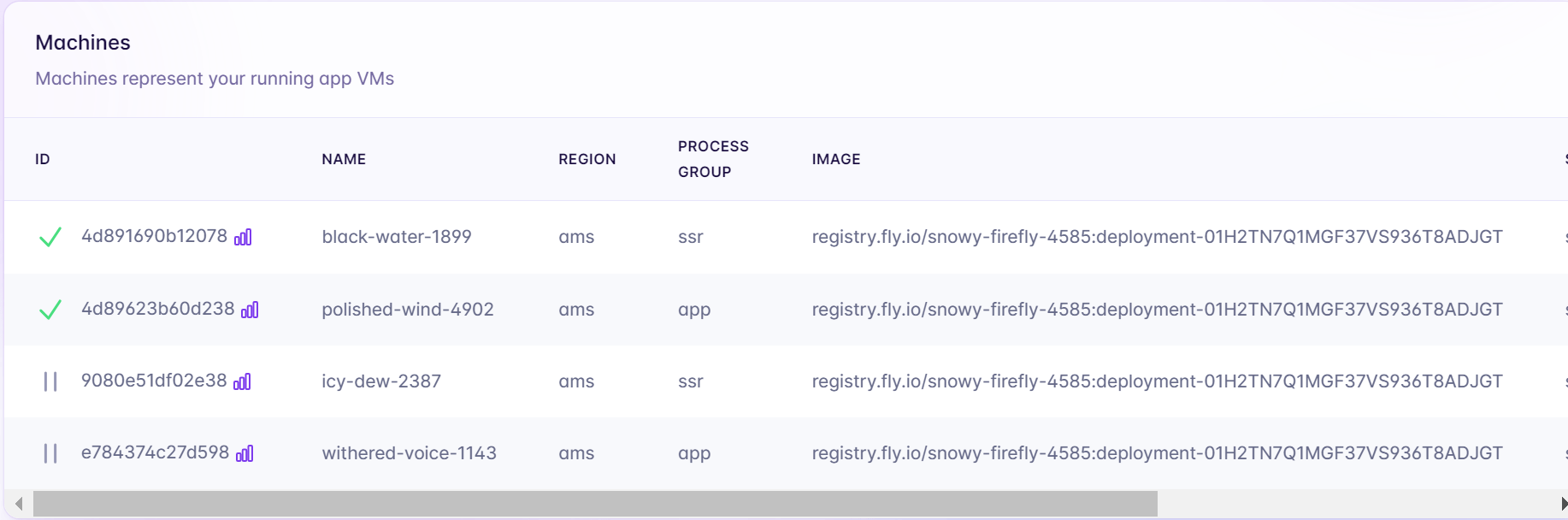 Notice there are four machines above? The two machines listed at the bottom are back ups.
Now that you have more than one process group for your Fly.io app, you'll have to make sure that the [`[http_service]`](/reference/configuration#the-http_service-section) is properly mapped to your `app` process. Update your `fly.toml`'s `http_service` section with the `app` process:
```toml theme={null}
[http_service]
internal_port = 8080
force_https = true
auto_stop_machines = true
auto_start_machines = true
min_machines_running = 0
+ processes = ["app"]
```
### Web and SSR Communication
The SSR server will be created as a separate VM from your web app. You'll have to configure your Laravel web VM to [talk with it](https://community.fly.io/t/process-group-aware-internal-dns-route-between-processes-with-ease/13063/4). To do so, first revise the `fly.toml` file to include an `SSR_URL` that will contain the ssr process' [.internal address](/networking/private-networking#fly-io-internal-addresses) routed to SSR's applicable port ( in the case below, 13714):
```.env theme={null}
[env]
SSR_URL="ssr.process..internal:13714"
// other envs here
```
Finally, pull the [inertia.php](https://github.com/inertiajs/inertia-laravel/blob/master/config/inertia.php) config file into your config directory, and update it to use the `SSR_URL` env variable:
```php theme={null}
/* config/inertia.php */
'ssr' => [
'enabled' => true,
'url' => env('SSR_URL','http://127.0.0.1:13714')
],
```
With that, do a quick `fly deploy` and you're good to go!
Notice there are four machines above? The two machines listed at the bottom are back ups.
Now that you have more than one process group for your Fly.io app, you'll have to make sure that the [`[http_service]`](/reference/configuration#the-http_service-section) is properly mapped to your `app` process. Update your `fly.toml`'s `http_service` section with the `app` process:
```toml theme={null}
[http_service]
internal_port = 8080
force_https = true
auto_stop_machines = true
auto_start_machines = true
min_machines_running = 0
+ processes = ["app"]
```
### Web and SSR Communication
The SSR server will be created as a separate VM from your web app. You'll have to configure your Laravel web VM to [talk with it](https://community.fly.io/t/process-group-aware-internal-dns-route-between-processes-with-ease/13063/4). To do so, first revise the `fly.toml` file to include an `SSR_URL` that will contain the ssr process' [.internal address](/networking/private-networking#fly-io-internal-addresses) routed to SSR's applicable port ( in the case below, 13714):
```.env theme={null}
[env]
SSR_URL="ssr.process..internal:13714"
// other envs here
```
Finally, pull the [inertia.php](https://github.com/inertiajs/inertia-laravel/blob/master/config/inertia.php) config file into your config directory, and update it to use the `SSR_URL` env variable:
```php theme={null}
/* config/inertia.php */
'ssr' => [
'enabled' => true,
'url' => env('SSR_URL','http://127.0.0.1:13714')
],
```
With that, do a quick `fly deploy` and you're good to go!