


Overview
Fly Machines are fast-launching VMs behind a simple API, enabling you to launch tightly isolated app instances in milliseconds all over the world. One interesting use case: running isolated dev environments for your users (or robots). Fly Machines are a safe execution sandbox for even the sketchiest user-generated (or LLM-generated) code. This guide explains how to use Fly Machines to securely host ephemeral development and/or execution environments, complete with dynamic subdomain routing usingfly-replay.
What your architecture should include
- Router app(s)
- A Fly.io app to handle requests to wildcard subdomains (
*.example.com). Usesfly-replayheaders to transparently redirect each request to the correct app and machine. If you have clusters of users (or robots) in different geographic regions, you can spin up a router app in multiple regions. See Connecting to User Machines for details on how to implement the routing pattern.
- A Fly.io app to handle requests to wildcard subdomains (
- User apps (pre-created)
- Dedicated per-user (or per-robot) Fly apps (more about why you should create a dedicated app per customer/robot), each containing isolated Fly Machines. App and Machine creation is not instantaneous, so we recommend provisioning a pool of these before you need them so you can quickly assign upon request.
- Fly Machines (with optional volumes)
- Fast-launching VMs that can be attached to persistent Fly Volumes.
Example Architecture Diagram
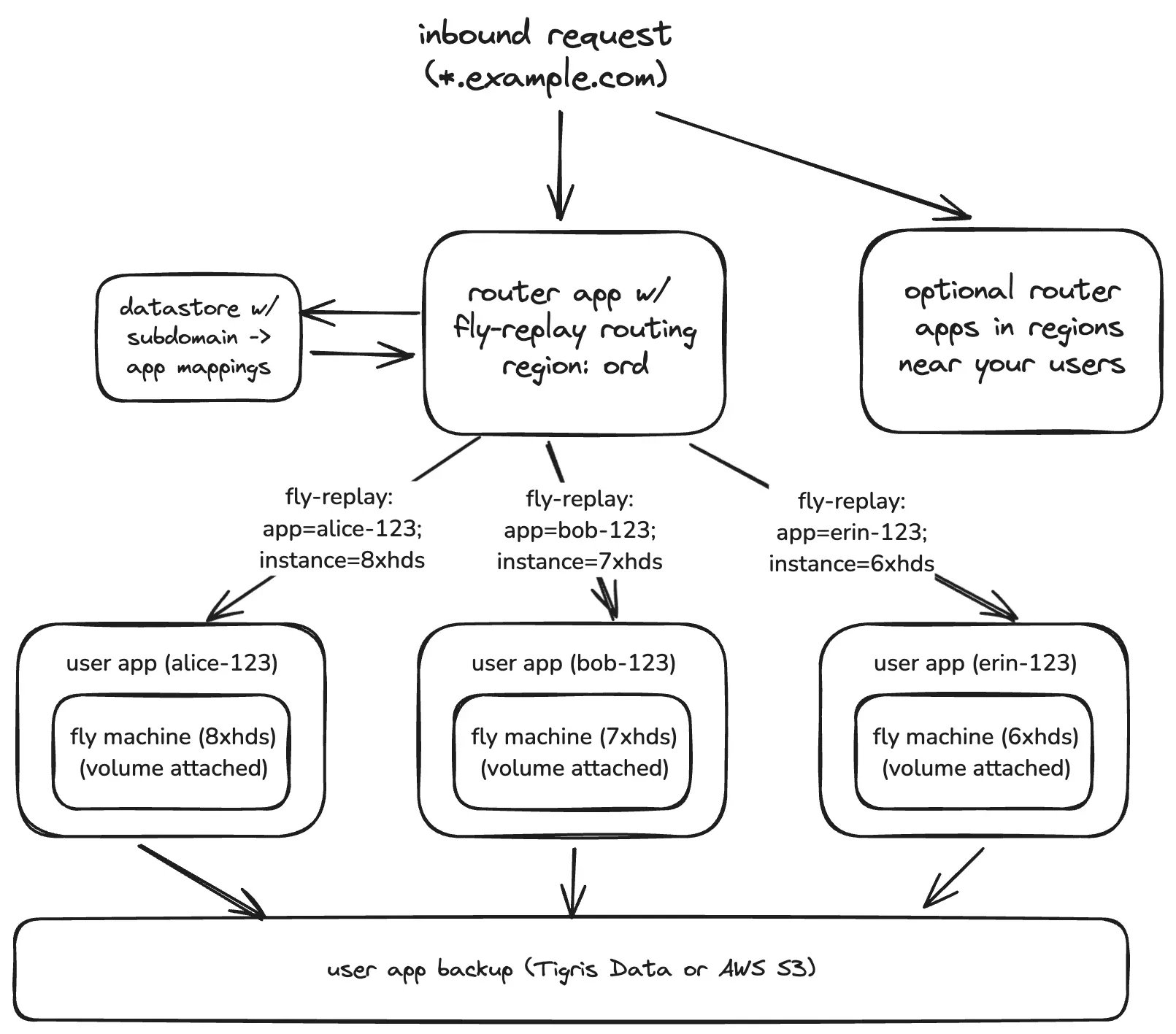
Router app(s)
Your router app handles all incoming wildcard traffic. Its responsibility is simple:- Extract subdomains (like
alice.example.com→alice-123). - Look up the correct app (and optionally machine ID) for that user.
- Issue a
fly-replayheader directing the Fly Proxy to internally redirect the request (this should add no more than ~10 milliseconds of latency if the router app is deployed close to the user). - When appropriate, use replay caching to further reduce latency and load on the router app.
- Make sure you’ve added a wildcard domain (*.example.com) to your router app (read more about the Certificates API reference).
User apps
Creating apps dynamically for each user at request time can be slow. To ensure fast provisioning:- Pre-create a pool of Fly apps and machines ahead of time (using the Fly Machines API or CLI).
- Store app details (e.g., app_name:
alice-123) in a datastore accessible to your router app. - Assign apps to users at provisioning time.
- Attach Fly Volumes to each machine at creation time.
- Keep in mind that machine restarts clear temporary filesystem state but preserve volume data.
- Learn more about the Machines API resource and the Volumes API resource.
Pointers & Footguns
- Machines & volumes are tied to physical hardware: hardware failures can destroy machines and attached volumes. Always persist important user data (code, config, outputs) to external storage (like Tigris Data or AWS S3).
- Your users will break their environments: pre-create standby machines to handle hardware & runtime failures, or the inevitable user or robot poisoned environment. Pre-create standby machines that you can quickly activate in these scenarios.
- Machine restarts reset ephemeral filesystem: the temporary Fly Machine filesystem state resets on Machine restarts, ensuring clean environments. However, volume data remains persistent, making it useful for retaining user progress or state.
- One app per user: Putting all user Machines into a single app and routing to them with dynamic routing works, but
auto_stopwon’t behave the way you expect once you scale. The Fly Proxy’s stop loop is rate-limited: it stops or suspends at most one Machine per region each pass, and runs every few minutes. That’s fine for a normal app; with thousands of Machines the loop can’t keep up, and most of your idle Machines stay running. Machines in a single app also share app-level secrets and a flat private network. A compromised user environment can reach every other Machine in the app. If you do keep all user Machines in one app, implement stop-when-idle behavior in your app or orchestrator (see apps that shut down when idle). Don’t rely on the Fly Proxy to keep most Machines stopped.
Related reading
- Connecting to User Machines How to manage routing and networking when you spin up a fleet of machines dedicated to individual users.
- Multi‑container Machines When your per‑user environment needs sidecars (logs, metric exporters, agent processes) alongside the main service.