

How it works
A self-hosted environment is a work queue. When a session is assigned to it, Anthropic enqueues a work item. A worker you run claims the item and starts a per-session Sprite that runs Anthropic’s tool runner. Tool inputs and outputs flow back to Anthropic so the model can see results; everything the tools touch stays in the Sprite.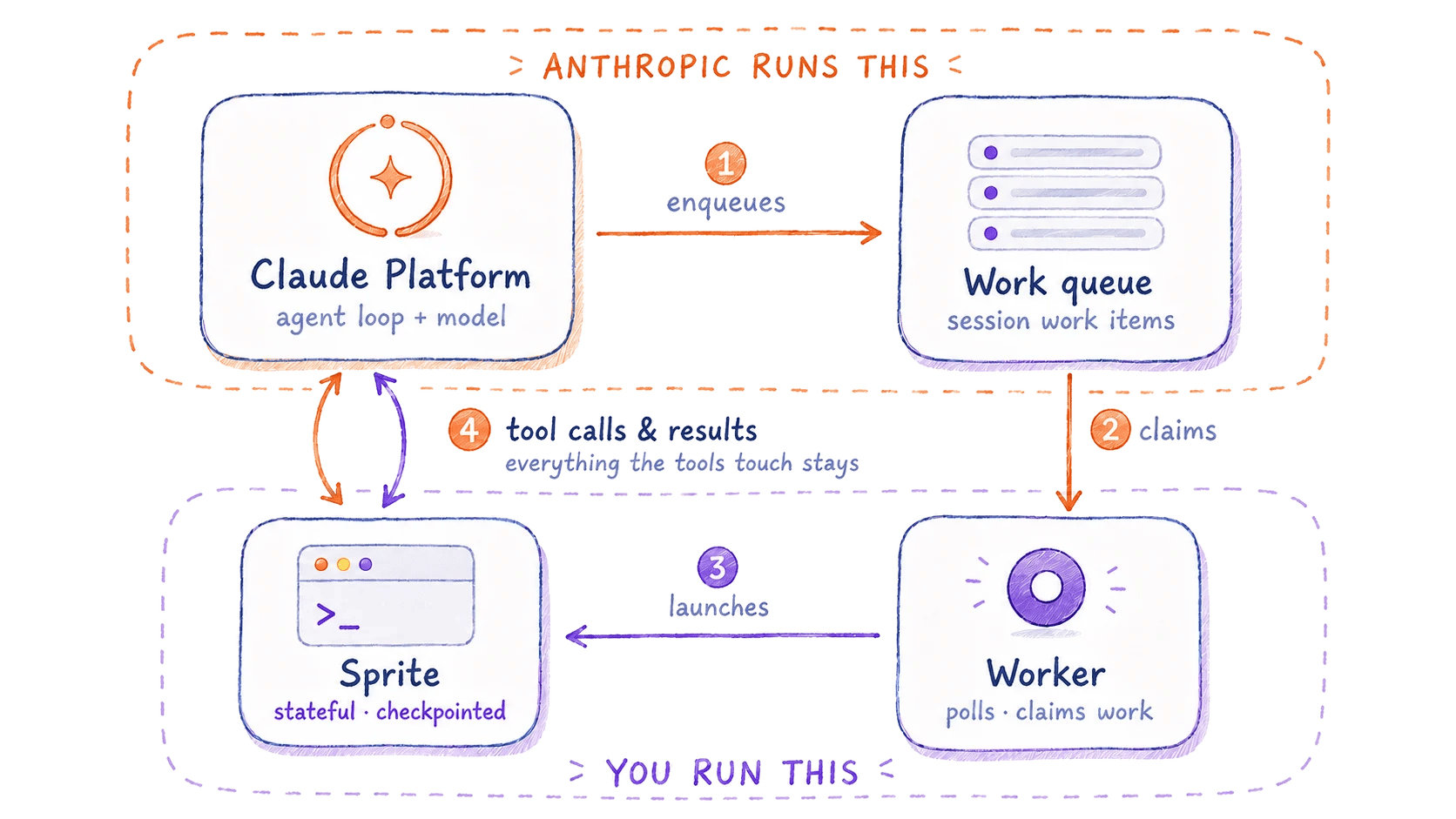
fly-apps/sprites-claude-managed-agents is a working Python reference implementation of this integration, with both worker variants (webhook and always-on poller) and the in-Sprite runner.Before you begin
You need:- A Claude API key (
ANTHROPIC_API_KEY) to create the environment and start sessions. It stays off the Sprite; the worker and runner use only the environment key. - A Sprites API token (
org-slug/org-id/token-id/token-value). Export it asSPRITE_TOKEN. - An Anthropic agent. Create one with the Quickstart and note its agent ID.
- A worker runtime on the worker host: Python 3.10+ with the
anthropicandhttpxpackages, or Node 22+ with@anthropic-ai/sdkandtsx.
Set up the environment
Create a self-hosted environment
env_…).
Generate an environment key
In the Console, open the environment and click Generate environment key. Export it alongside the environment ID on the worker host:Run the worker
Spawn a Sprite per session
The worker creates a Sprite, uploads Anthropic’s provider-agnostic runner, installs the SDK, and launches it as a Sprite service rather than a detachednohup process. A service is supervised: the Sprite owns it, so it survives beyond the request that created it and is restored on wake, neither of which a process backgrounded inside a single request can be counted on to do. Because a service that exits is otherwise restarted, the one-shot worker stops itself on completion so it is not brought back up.
The ANTHROPIC_* variables are written to a file the service sources rather than passed as service arguments, so the environment key never appears in process listings. The service deletes the file right after sourcing it, so the key isn’t left on the Sprite’s disk.
A service is supervised, but it does not hold the Sprite in an active state: once a session is underway the runner takes no inbound traffic, so a bare service counts as quiet and the Sprite would pause after a short idle window, stalling a long session mid-turn. That is why the service command registers a Task and heartbeats it while the runner works: the task holds the Sprite active for the length of the session, and its short expiry is the crash-safety net that lets the Sprite pause again if the runner dies without cleaning up.
Claim work items
The worker claims sessions from the queue and callsspawn() for each. Choose the always-on poller (only needs outbound HTTPS) or a webhook (no idle poller, needs a public endpoint).
auto_stop=False because each item is handed to a Sprite that owns its own stop; the poller must not release the lease out from under it. For the webhook variant, verify the session.status_run_started delivery, then drain the queue with poller(drain=True, auto_stop=False) and call spawn() the same way.
Start a session
Create a session targeting the environment, then send the agent a turn. The worker claims it, starts a Sprite, and the agent’s tools run inside it./workspace, though an agent given no explicit path may write an absolute one elsewhere. /workspace is Anthropic’s system default working directory for tool execution, and the runner passes workdir="/workspace" to match it, so that workdir is what scopes and permits /workspace access. unrestricted_paths=True is what additionally lets the file tools reach paths outside the workdir, notably /mnt/session/outputs, where Anthropic’s harness normally directs final deliverables (here just a directory on the Sprite’s disk).
A Sprite proxies a single internal HTTP port to its public URL, has a durable filesystem, and supports checkpoints. Because this flow creates a fresh Sprite per session, the SDK install runs every time. To drop that cost, reuse a pool of prepared Sprites instead of creating one per session, and restore each Sprite’s own checkpoint (with the SDK baked in) to reset it between sessions. On the TypeScript worker, the in-Sprite runner can instead be a bundled Node script (the TS SDK’s
EnvironmentWorker has full parity with the Python worker), which removes the pip install and roughly halves cold start, about 10s versus 16s send-to-first-tool in our tests. The cookbook will carry that bundled-runner variant.Clean up
Each session gets its ownclaude-agent-* Sprite, and those Sprites outlive the session. An idle Sprite pauses, which stops compute billing, but its filesystem persists and keeps accruing storage cost until you delete it, so a busy environment builds up a fleet of paused Sprites. Reap each one once its session finishes, on the session-end webhook or with a periodic sweep, by calling DELETE /v1/sprites/{name}; copy anything you need out of /workspace first (for example via the filesystem API), because deleting a Sprite deletes its checkpoints too.
Troubleshooting
Most failures here surface either as a queue that never drains or as a Sprite service that exits early. Check the service log first; it usually tells you which side broke.See also
- Self-hosted sandboxes: Anthropic’s reference for the worker contract.
- Services: supervised long-running processes inside a Sprite.
- Checkpoints: snapshot a prepared Sprite to skip cold-start setup.