


This guide from Rails and JS expert Sam Ruby is based on his personal capacity as a ballroom dance nerd. It covers how a serverful, stateful, shared-nothing architecture hit the spot for him when it came time to scale to multiple customers in different parts of the world.
Introduction
Once upon a time, I found myself double booked at a ballroom dance competition. Read that story in more detail on my blog, but essentially: you’re only supposed to get one shot to dance in a given heat, and I ended up listed twice in the spreadsheet for that heat. I decided to write an app to take the load of manual entry and scheduling off of organizers, and so that no one would ever be asked to do something impossible and be at two places at one time. Showcase (that’s what I called it) started out as a Ruby on Rails app and a database; it kept track of competitors and their schedules for a single Showcase (that’s what these ballroom dance events are called). I ran it on a single Mac Mini in my home. Over time, it grew out of my attic and onto VMs in the cloud. It supports more events in different cities, and does more things. Conventional wisdom is that as you grow, you make each type of service reusable and put it into a separate set of machines. If this approach isn’t the best one for your app, throw it out the window! I did. In my case, it made a lot of sense to put all the services into a single VM, and scale out by repeating that set into new VMs. This works great for me. Maybe it’s right for your app, too! Maybe not! Prepare to bathe in the gory details of my stateful, serverful, shared-nothing monolith.Shared-nothing architectures
A shared-nothing architecture is a distributed computing architecture in which each update request is satisfied by a single node (processor/memory/storage unit) in a computer cluster.
The intent is to eliminate contention among nodes. Nodes do not share (independently access) the same memory or storage. One alternative architecture is shared everything, in which requests are satisfied by arbitrary combinations of nodes. This may introduce contention, as multiple nodes may seek to update the same data at the same time.While serverless is one kind of a shared-nothing architecture - this post explores another variation. One where servers are explicitly deployed, users are assigned to servers, and users have databases that aren’t shared. This application started, like most applications, small. And that’s where the story begins.
A single event
A Fly.io machine is not merely a Docker container, but rather a full VM. Treat it as such: run as many services as you like on a single machine.
Every time you extract a collaboration between objects to a collaboration between systems, you’re accepting a world of hurt with a myriad of liabilities and failure states. What to do when services are down, how to migrate in concert, and all the pain of running many services in the first place.Another way to look at this is: as needs grow, do you really want to share a database and Redis instances between customers? (Or, in this case, between events?) If “no” turns out to be a viable answer: go with it. Put all of the services needed to support one customer in one Docker image and then repeat that set as often as needed. Eliminating the need for a network in producing a response to a request both increases throughput and reliability. There are a lot of options for running multiple processes inside a Fly.io App. I use a combination of ENTRYPOINT running a deploy script and a procfile. Given the load for each event is only for one customer, I only need 1 CPU per server. While CPU is not a concern, it still is important to size the amount of RAM needed. Even with all of the services running, according to Graftana/Fly Metrics, each instance uses about 220MB of RAM when idle, and grows to 450MB when active. That being said, I have seen machines fail due to OOM with only 512MB, so I give each machine 1GB. I also define an additional 2G of swap as I would rather the machine run slower under peak load than crash. Finally, invest the time to set up a WireGuard network that lets you VPN into your own private network of machines.
Multi-tenancy
The code base supports only a single event. Running multiple events on a single machine is the next step before jumping into multiple machines.
passenger_min_instances
0 option that allow a reasonable number of past, present, and future events
to be hosted essentially without any overhead when not in use. This does mean
that you have to accept the cold start times of the first access, but that
appears to be two seconds or less on modern hardware, which is acceptable.
The NGINX configuration file defines a set of environment variables for each tenant to control
the name of such things as the database, the log file, base URL, and pidfile.
For web sockets (Action Cable), NGINX is preferred over Apache
httpd.
The documentation for Deploying multiple apps on a single server
(multitenancy) is
still listed as todo, but the following is what I have been able to figure out:
- One action cable process is allocated per server (i.e., listen port).
- In order to share the action cable process, all apps on the same server will need to share the same Redis URL and channel prefix. The Rails documentation suggests that you use a different channel prefix for different applications on the same server — IGNORE THAT.
- Instead, use environment variables to stream from, and broadcast to, different action cable channels.
auto_stop_machines = false), but the Rails apps are spun up when needed and spin down when idle (using passenger_pool_idle_time)
Multiple regions
Distributing an app across multiple regions not only lets you service requests close
to your users, it enables horizontal scalability and isolation.
This happens by intercepting all clicks on <a href> links to the same domain. When you click an eligible link, Turbo Drive prevents the browser from following it, changes the browser’s URL using the History API, requests the new page using fetch, and then renders the HTML response.
The same source above also defines a window.inject_region function to inject the header in other places in the code that may issue fetch requests.
The next (and final) two approaches are done in the NGINX configuration itself. This configuration is defined at startup on
each machine. Here is an example of the definition for raleigh on machines in regions other than iad:
.internal address. The latter is done because fly-replay
is limited to 1MB requests, and uploading audio files may exceed this limit.
Appliances
For larger tasks, try
decomposing parts of your applications into event handlers, starting up Machines to handle requests when needed, and stopping them when the requests are done.
auto_stop_machines and auto_start_machines,
a machine dedicated to this task can be spun up in seconds and perform this function.
In my case, no changes to the application itself is needed, just a few lines of NGINX configuration:
Backups
Running databases on a single volume attached to a single machine is a single
point of failure. It is imperative that you have recent backups in case of failure.
passenger_min_instances to zero, allowing
each application to completely shutdown after five minutes of inactivity. I define a
detached_process hook to run
a script.
As that hook will be run after each process exits, what it does first is query the number of running processes. If
there are none (not counting websockets), it begins the backup to each Fly.io machine
using rsync --update to only replace the newer files. After that completes, a webhook
is run on an offsite machine (a mac mini in my attic) to rsync all files there. In order for that to work, I run
an ssh server on each Fly.io machine.
And I don’t stop there:
- My home machine runs the same passenger application configured to serve all of the events. This can be used as a hot backup. I’ve never needed it, but it comforting to have.
- I also rsync all of the data to a Hetzner which runs the same application.
- Finally, I have a cron job on my home machine that makes a daily backup of all of the databases. A new directory is created per day, and hard links are used to link to the same file in the all too common case where a database hasn’t changed during the course of the day. As this is in a terabyte drive, I haven’t bothered to prune, so at this point, I have daily backups going back years.
auto_extend_size_threshold and
auto_extend_size_increment to ensure that I never run out of space.
Logging
It is important that logs are there when you need them. For this reason, logs need both monitoring and redundancy.
- Since I have volumes already, I instruct Rails to broadcast logs there in addition to stdout. The API to do this changed in Rails 7.1, and the code I linked to does this both ways. This data isn’t replicated to other volumes and only contains Rails logs, as it really is only intended for when all else fails.
- I have a logger app that I run in two regions. This writes log entries to volumes, and runs a small web server that I can use to browse and navigate the log entries. This data too is backed up (forever) to my home server, and is only kept for seven days on the log server.
- I have each machine create a heartbeat log entry every 30 minutes, and each log server runs a monitor once an hour to ensure that every machine has checked in. If a machine doesn’t check in, a Sentry alert is generated.
- I have my log tracker query Sentry whenever I visit the web page to see if there are new events. This serves as an additional reminder to go check for errors.
Applying updates
While Fly.io will start machines fast, you have to do your part.
If your app doesn’t start fast, start something else that starts quickly first
so your users see something while they are waiting.
fly deploy can’t simply start a new machine, wait for it to start, direct traffic to it, and only then start dismantling the previous machine. Instead, each machine needs to be taken offline, have the rootfs replaced with a new image, and all of its services restarted. Once that is complete, migrations need to be run on that machine; and in my case I may have several SQLite databases that need to be upgraded. I also have each machine that comes up rsync with the primary region. And finally, I generate an operational NGINX configuration and run nginx reload.
While this overall process may take some time, NGINX starts fast so I start it first with a configuration that directs everything to a Installing updates.. page that auto refreshes every 15 seconds which normally is ample time for all this to occur. Worst case, this page simply refreshes again until the server is ready.
Even with this in place, it still is worthwhile to make the application boot fast. Measuring the times of the various components of startup, in my case Rails startup time dominates, and it turns out that effectively bin/rails db:prepare starts Rails once for each database.
I found that I can avoid that by getting a list of migrations,
and then comparing that list to the list of migrations already deployed.
I also moved preparation of my demo database to build time. In most cases, this means that my users
see no down time at all, just an approximately two second delay on their next request as Rails restarts.
Administration
While Fly.io provides a Machines API,
you can go a long way with old-fashioned scripting using the flyctl
command.
fly deploy would produce. I don’t need that headache, so I’m actually using fly deploy which can add tens of seconds to the actual deploy time.
I started out running the various commands manually, but that grew old fast. So eventually
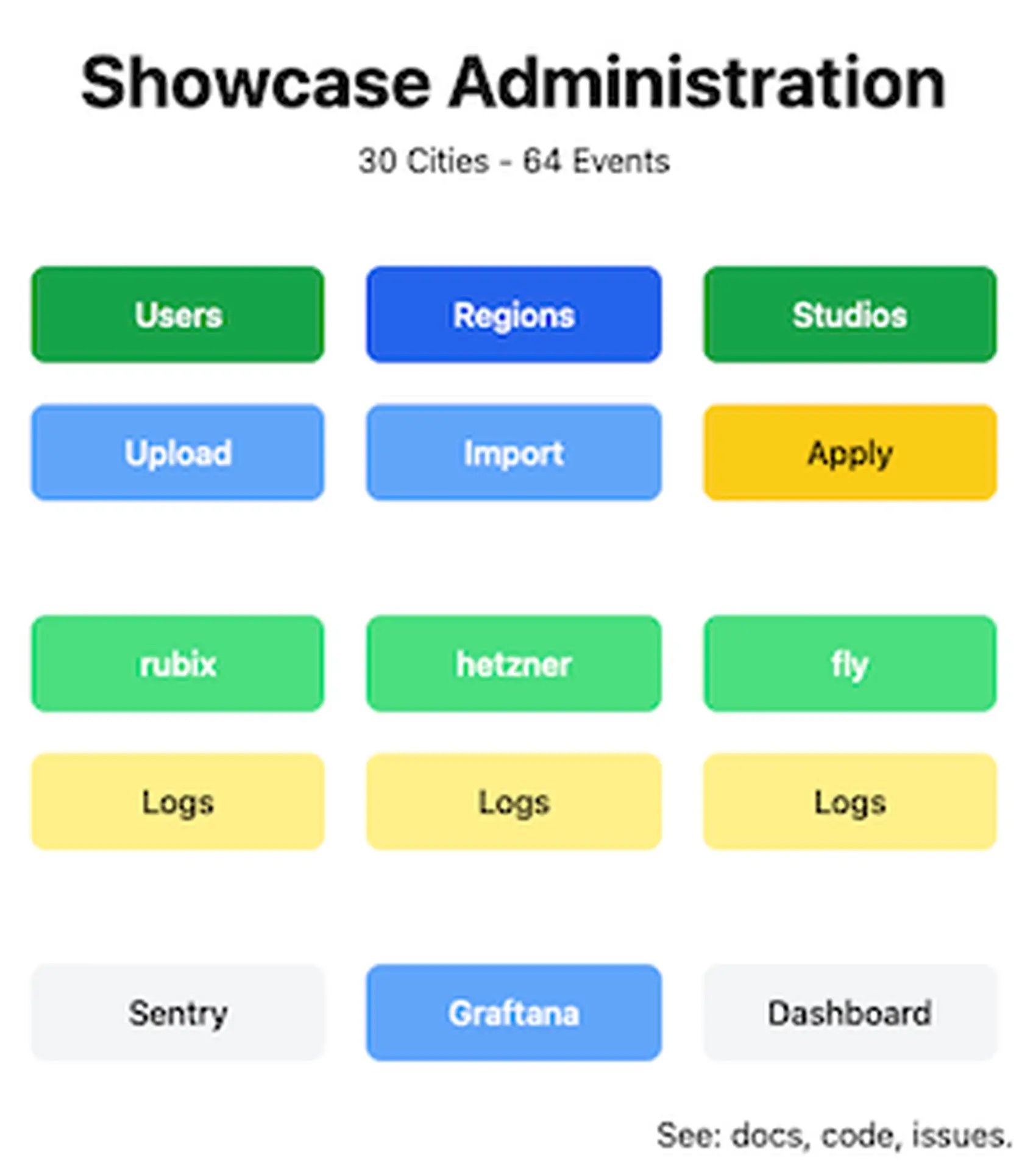
I invested in creating an admin UI.
Here’s what the front page of the admin UI looks like:
Costs
This is a decent sized personal project, deployed across three continents. Even with a
significant amount of over-provisioning, the costs per month are around $60, before taking
into account plans and allowances.
Summary
Shared Nothing architectures are a great way to scale up applications where the data involved is easily partitionable.
- Run as many services as you like on a single machine; this both increases throughput and reliability.
- You can even run multiple instances of the same app on a machine.
- Distributing your apps across multiple regions lets you service requests close to your users.
- For larger tasks, start up machines on demand.
- Every backup plan should have a backup plan.
- Not only should you have logs, logs should be monitored and have redundancy.
- Make sure that you start something quickly — even if it is only a “please wait” placeholder — to make sure that your app is always servicing requests.
- Create an administration UI and write scripts you can use to change your configuration.
Background
Feel free to skip or skim this section. It describes how the application came to be, what it does, and a high level description of its usage needs.
I was at a local ballroom dance competition and found myself listed twice in one heat - a scheduling mishap where I was expected to be on the floor twice with two different dance partners. After the event, Carolyn and I discovered that the organizers used a spreadsheet to collect entries and schedule heats. A very manual and labor prone process, made more difficult by the need to react to last minute cancellations due to the ongoing pandemic. Carolyn told the organizers that I could do better, and volunteered me to write a program. I thought it would be fun so I agreed.This application is on GitHub, and while each individual event requires authentication for access, a full function demo can be accessed at https://smooth.fly.dev/. It was originally deployed a single Mac mini, and now is running on a small fleet of machines in the Fly.io network.
Couples ballroom dance competitions are called a “Showcase”. The application supports:
- managing all the contestants
- storing and playing dance music for solos
- invoicing students and studios
- managing the schedule
- printing heat sheets, back numbers, and labels
- recording the judges’ scores
- publishing results
The core Showcase application is implemented on top of Ruby on Rails, augmented by two separate services implemented in JavaScript an run using Bun. While the details may vary, many of the core principles described below apply to other applications, even applications using other frameworks. In fact, many of the pieces of advice provided below apply to apps you host yourself, or host on other cloud providers. But first, some useful approximations that characterize this app, many of which will guide the choice of architecture:
- Each event is a separate instance of the Rails application, with a its own separate database.
- A typical database is one megabyte. Not a typo: one megabyte. Essentially, the app is a spreadsheet with a Turbo web front end.
- All the services needed to support an event are run on a single VM.
- Persistence consists of the database, storage (used for uploaded audio files), and logs.
- Typical response time for a request is 100ms or less.
- Peak transaction per second per database is approximately 1. Again, not a typo — think spreadsheet.
- Peak number of simultaneous users is often one, but even when there are multiple they tend to be all in the same geographic region, often in the same room (example: multiple judges entering scores).
- Transactions are generally a blend of reads and writes with neither dominating.
Related reading
- Getting Started with N‑Tier Architecture A contrasting architecture pattern where state is shared across the data tier — useful for understanding when shared‑nothing isn’t the best fit.
- Session Affinity (a.k.a. Sticky Sessions) Focused on routing and state‑isolation patterns that often come up when you adopt a shared‑nothing approach and need to keep state local to a machine.
- Networking The comprehensive networking overview (private networks, Anycast, WireGuard tunnels, routing) — helpful when building globally distributed isolated nodes in a shared‐nothing architecture.